MiniBytez
Industries

Seven operating environments, one way of building.

The architecture repeats between sectors. The rules, the language and the awkward exceptions never do, so every system we build starts from how your operation actually runs. Where we have delivered, we say so and show it.

  • Customer operationsAccounts, enquiries, service
  • CommerceOrders, payments, renewals
  • Service deliveryEngagements, SLAs, sign-off

One systems layer

  1. Records and identity
  2. Workflow and approvals
  3. Integration and APIs
  4. Automation and AI
  5. Data and reporting
  • WorkforceRosters, skills, permissions
  • Facilities and sitesBuildings, assets, access
  • Field operationsJobs, routes, devices
Illustrative: one engineered layer, shaped to each operating environment it serves.

How to read the evidence on this page

Sector delivery
Client work delivered in fitness and wellness, the sector we have the most public proof in. Client names withheld.
Delivered work
A delivered MiniBytez project, described on the Work pages.
Live demonstration
Software we built, open in your browser. Invented data.
Sample interface
A capability illustration, not a client system.
Capability application
Where our engineering applies. Not a claim of client experience.
Illustrative pattern
A conceptual model of how the systems fit together.
Operating models

The same building blocks, carrying different weight.

Every organisation runs on customers, people, assets, transactions, access, data and rules. Which of them carry the operation, and what each is called, is what makes a sector different.

Each shape is how that kind of organisation typically operates. They are examples of operating patterns, not accounts of client work.

Enterprise & Internal Operations

Capability application

Work crosses departments, and every step needs an owner, a limit and a record.

  • Customers, present:Business units and internal customers
  • Workforce, carries the operation:Employees, managers and approvers
  • Assets and sites, present:Equipment, licences and offices
  • Transactions, carries the operation:Requests, orders and invoices
  • Physical access, rarely central:Office entry, usually handled elsewhere
  • Digital access, carries the operation:Roles, delegation and single sign‑on
  • Data and reporting, carries the operation:Budgets, spend and management packs
  • Regulation and audit, carries the operation:Policy, segregation of duties, audit
  • Service delivery, present:Internal requests and service levels
  • Carries the operation
  • Present
  • Rarely central
Sector coverage

Where the same engineering already applies.

What the operation needs, what we would build and where to read more. These are not claims of client experience in each sector; delivered work and live demonstrations nearby are labelled as what they are.

Capability application

Enterprise & Internal Operations

Finance, procurement, HR and operations each run their own system. The work that crosses between them runs on email, spreadsheets and whoever remembers to chase it.

Operating chain

  1. Request
  2. Approval
  3. Purchase order
  4. Invoice
  5. Spend reporting
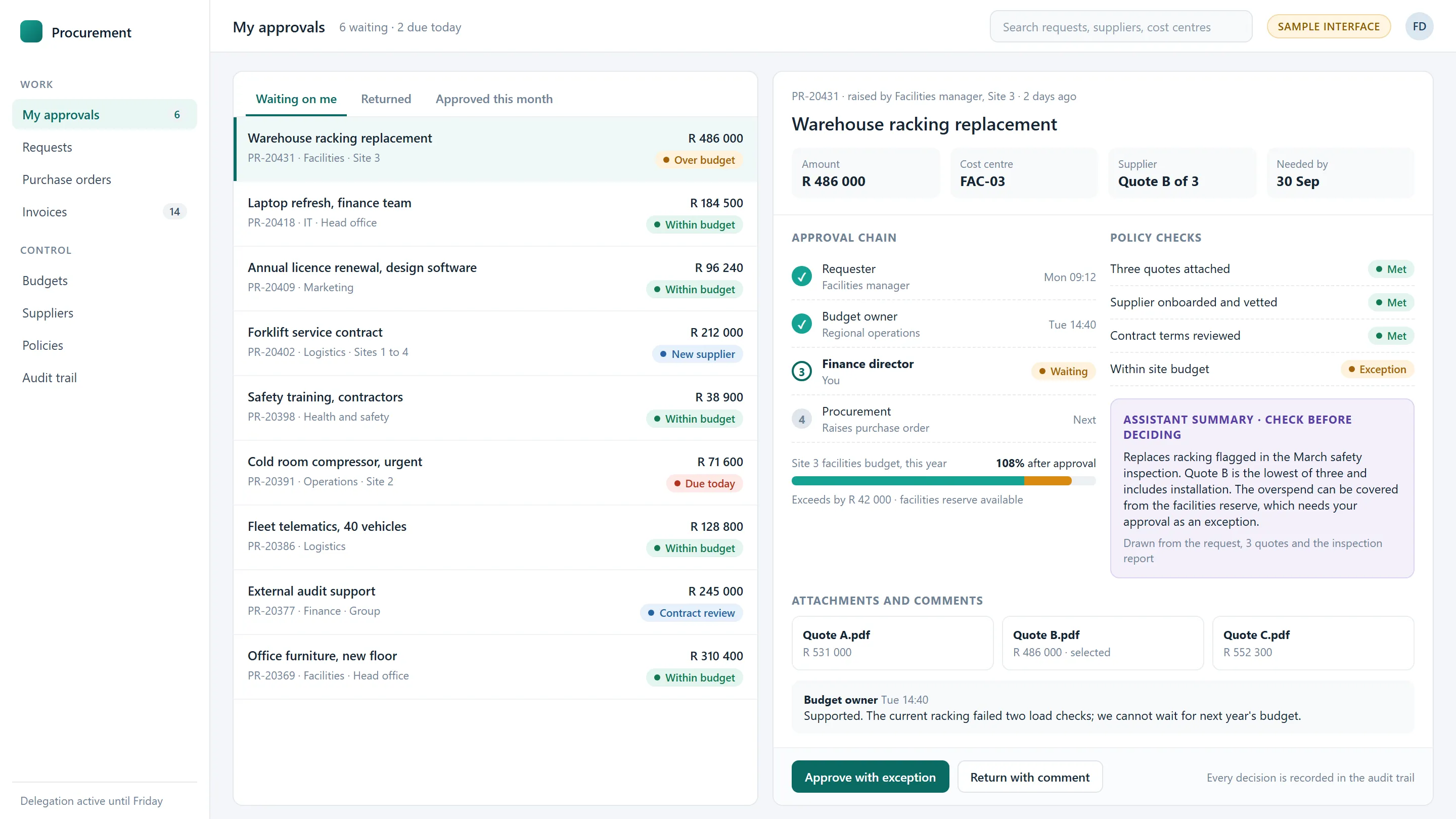
Sample interface · approvals and procurement
Sample interface of a procurement approval queue: a purchase request with its approval chain, policy checks, budget impact and an assistant summary awaiting a person’s decision.
Sample interface
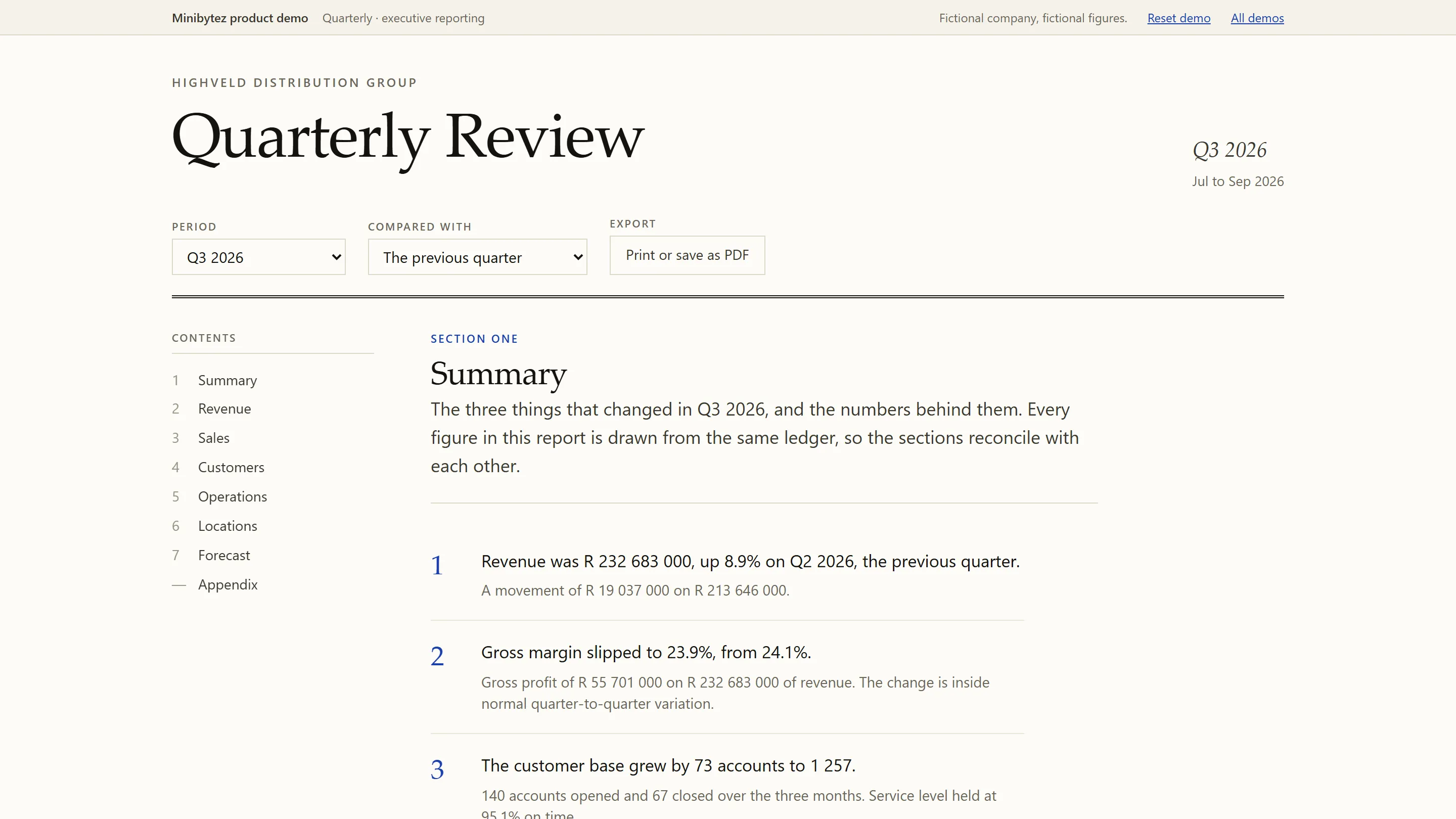
Detail from Quarterly, a live MiniBytez demonstration with invented data: executive reporting from one set of figures.
Quarterly · live demo

Systems we would build

  • Approval workflows
  • ERP and HR integration
  • Internal tools
  • Executive reporting

Evidence nearby

Capability application

Professional Services

Delivery, time, billing and client communication run on processes no off-the-shelf product models properly, so work in progress and margin only surface at month end.

Operating chain

  1. Client
  2. Engagement
  3. Time approval
  4. Invoice
  5. Margin
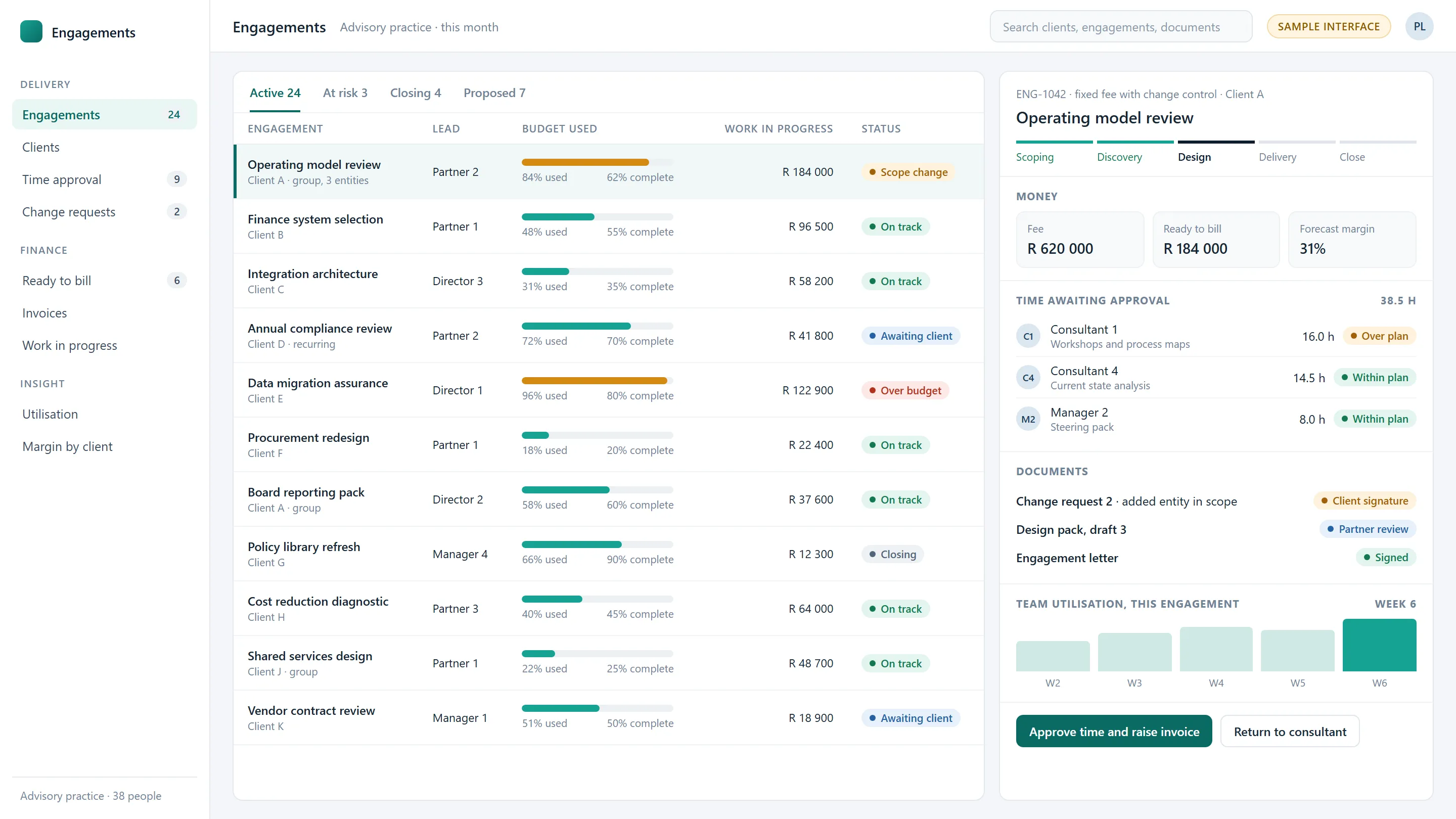
Sample interface · engagements and billing
Sample interface of a professional services engagement list: budget used against progress for each engagement, and an engagement with its stages, fee, work ready to bill, time awaiting approval and documents awaiting signature.
Sample interface
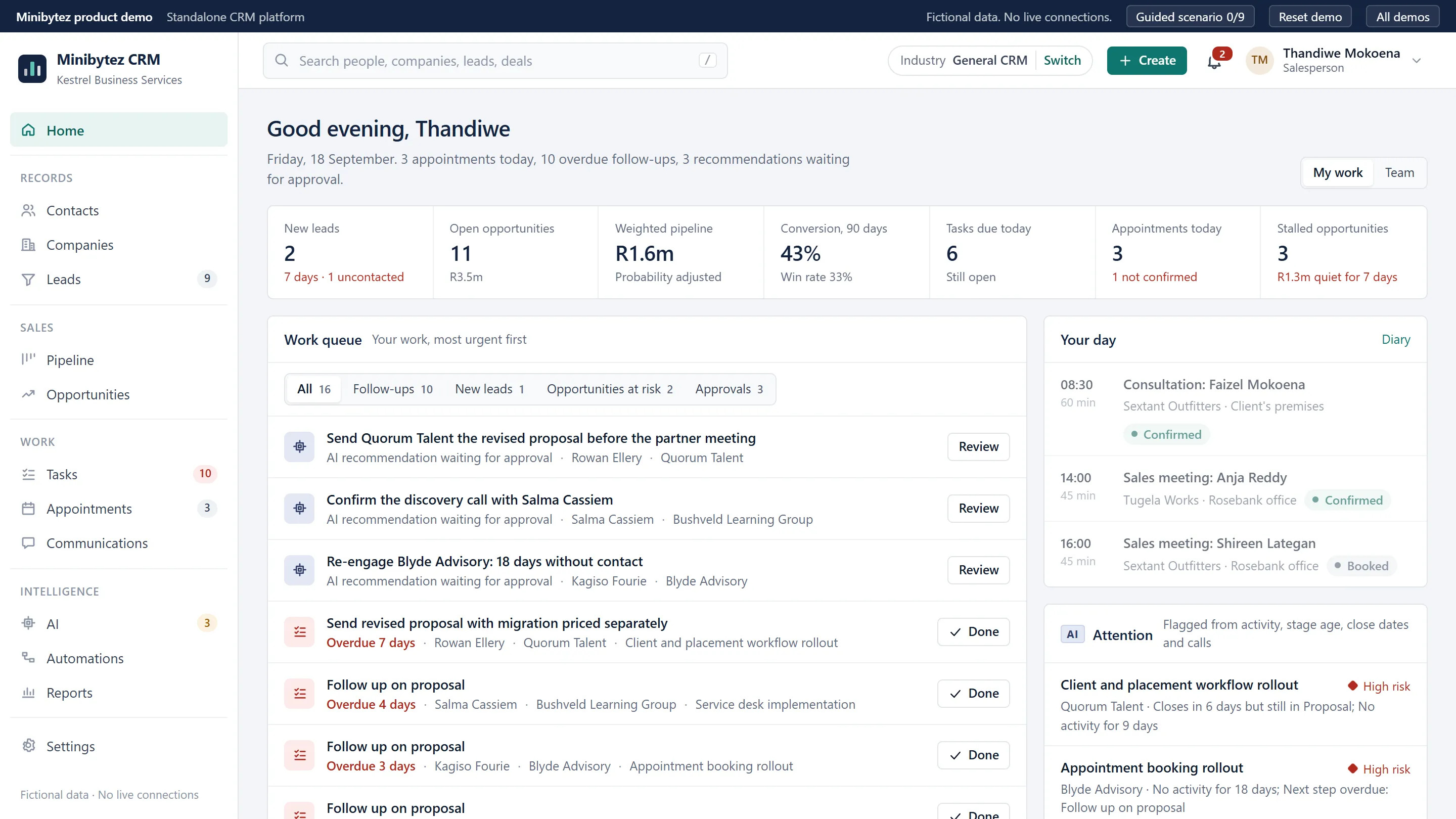
Detail from MiniBytez CRM, a live MiniBytez demonstration with invented data: a work queue where ai suggestions wait for a person.
MiniBytez CRM · live demo

Systems we would build

  • Client management
  • Approvals
  • Document workflows
  • Utilisation reporting

Evidence nearby

Capability application

Property & Facilities

Sites, assets, contractors and occupiers produce physical events: a door, a fault, a visit. They belong in the same record as the lease, the contract and the cost.

Operating chain

  1. Tenant
  2. Access
  3. Maintenance
  4. Contractor
  5. Reporting
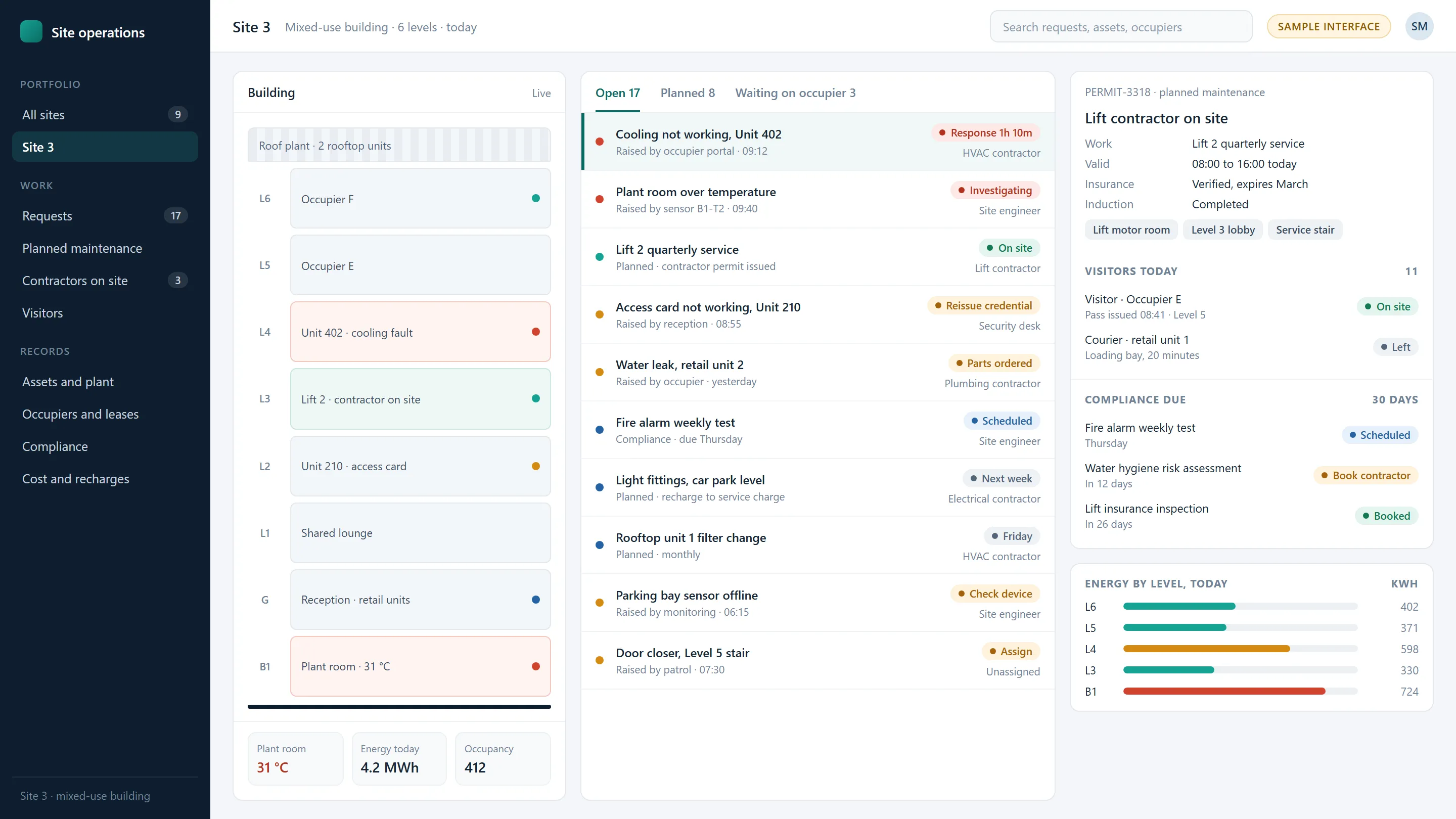
Sample interface · site operations
Sample interface of a building operations screen: levels of a building with open faults, a list of maintenance requests from occupiers and sensors, a contractor permit with the zones it opens, visitors, compliance dates and energy by level.
Sample interface
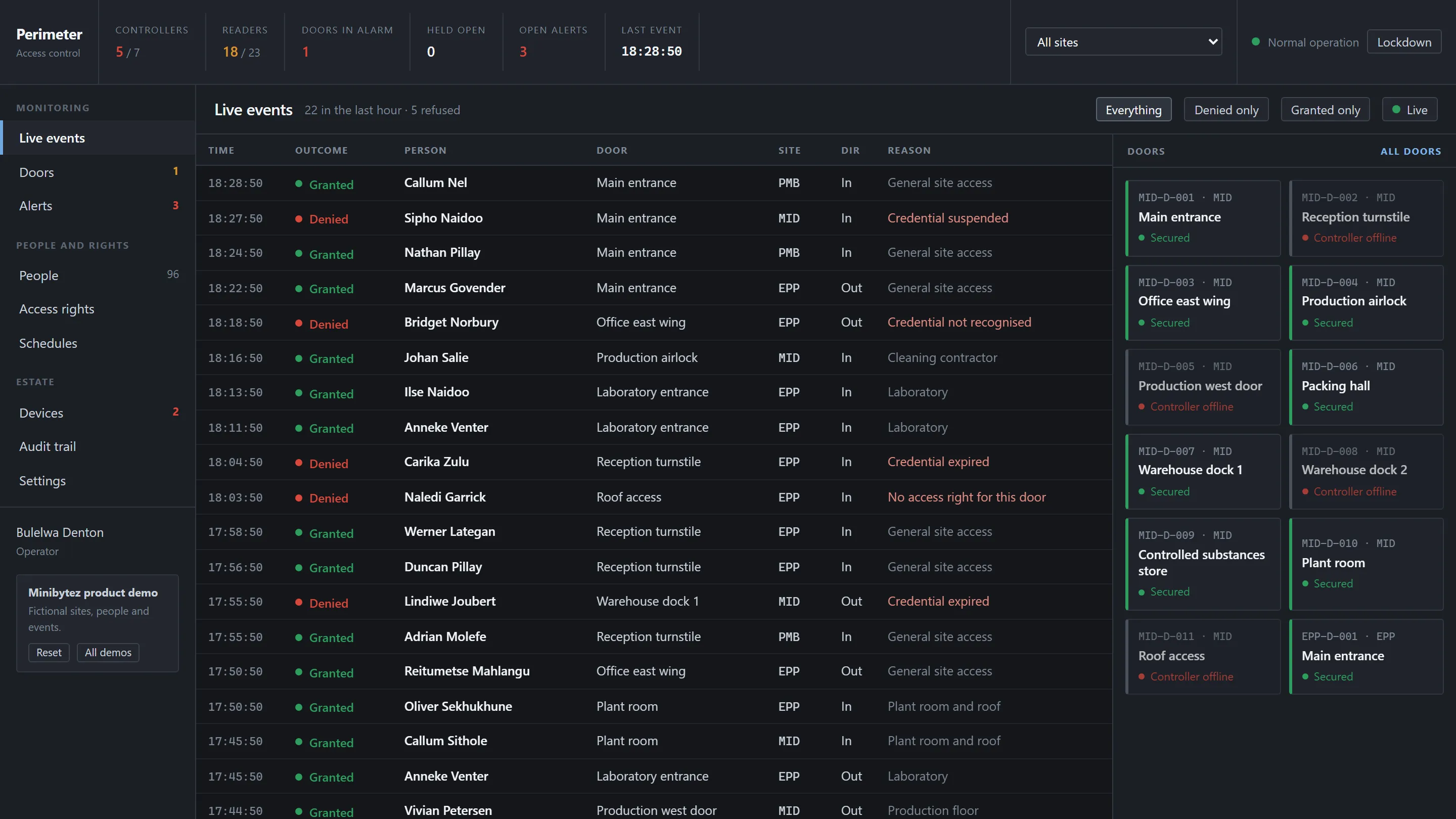
Detail from Perimeter, a live MiniBytez demonstration with invented data: door state across a site, live.
Perimeter · live demo

Systems we would build

  • Job management
  • Access and visitors
  • Sensor data
  • Supplier and cost control

Evidence nearby

Capability application

Field & Service Operations

People, vehicles and parts are scheduled across customers and locations. The office sees a plan, the field sees a phone, and the job closes only when both agree.

Operating chain

  1. Job
  2. Dispatch
  3. Visit
  4. Sign-off
  5. Invoice
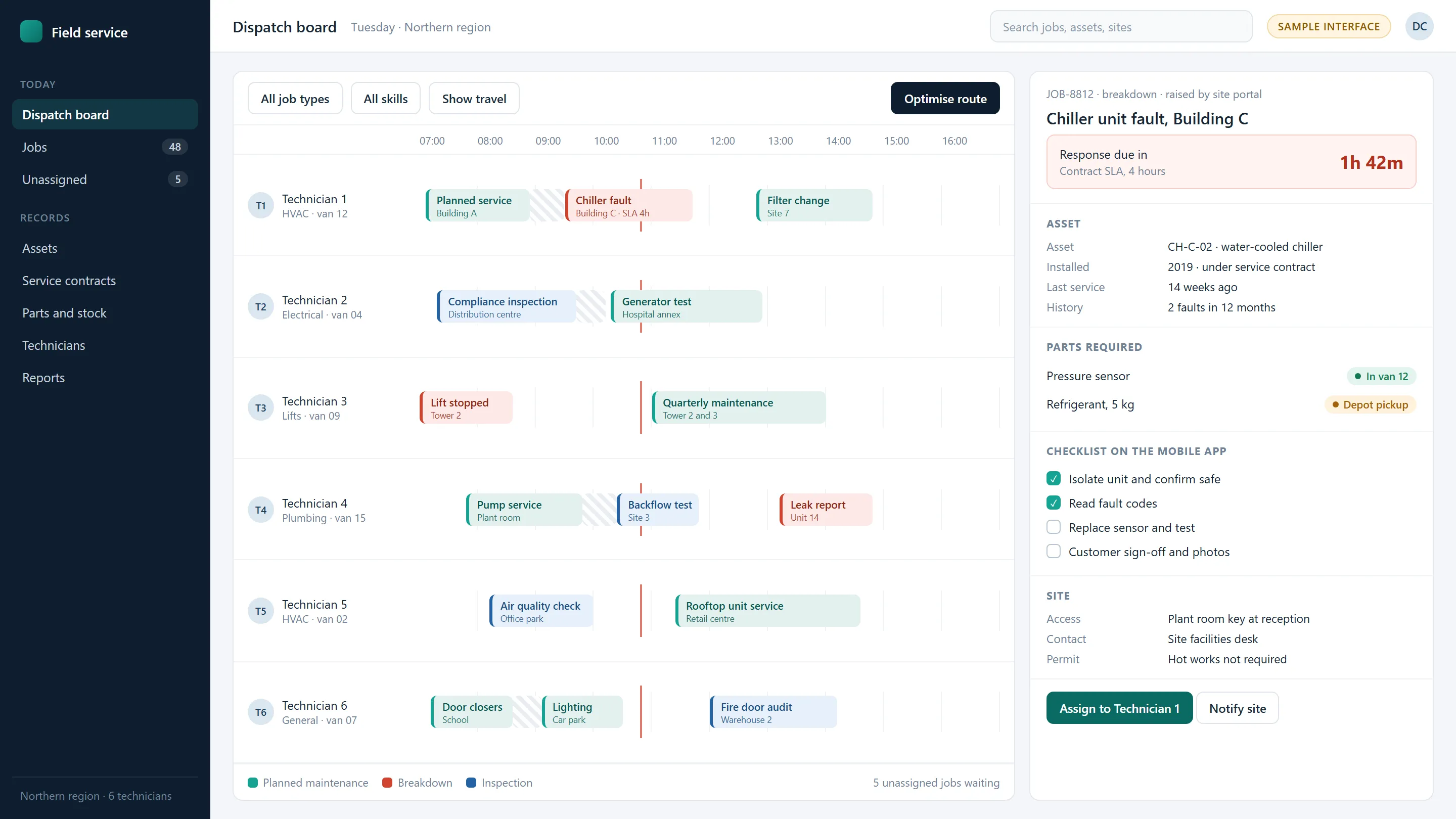
Sample interface · field service and assets
Sample interface of a field service dispatch board: technicians scheduled across the day, and a breakdown job with its asset record, service level countdown, parts and mobile checklist.
Sample interface
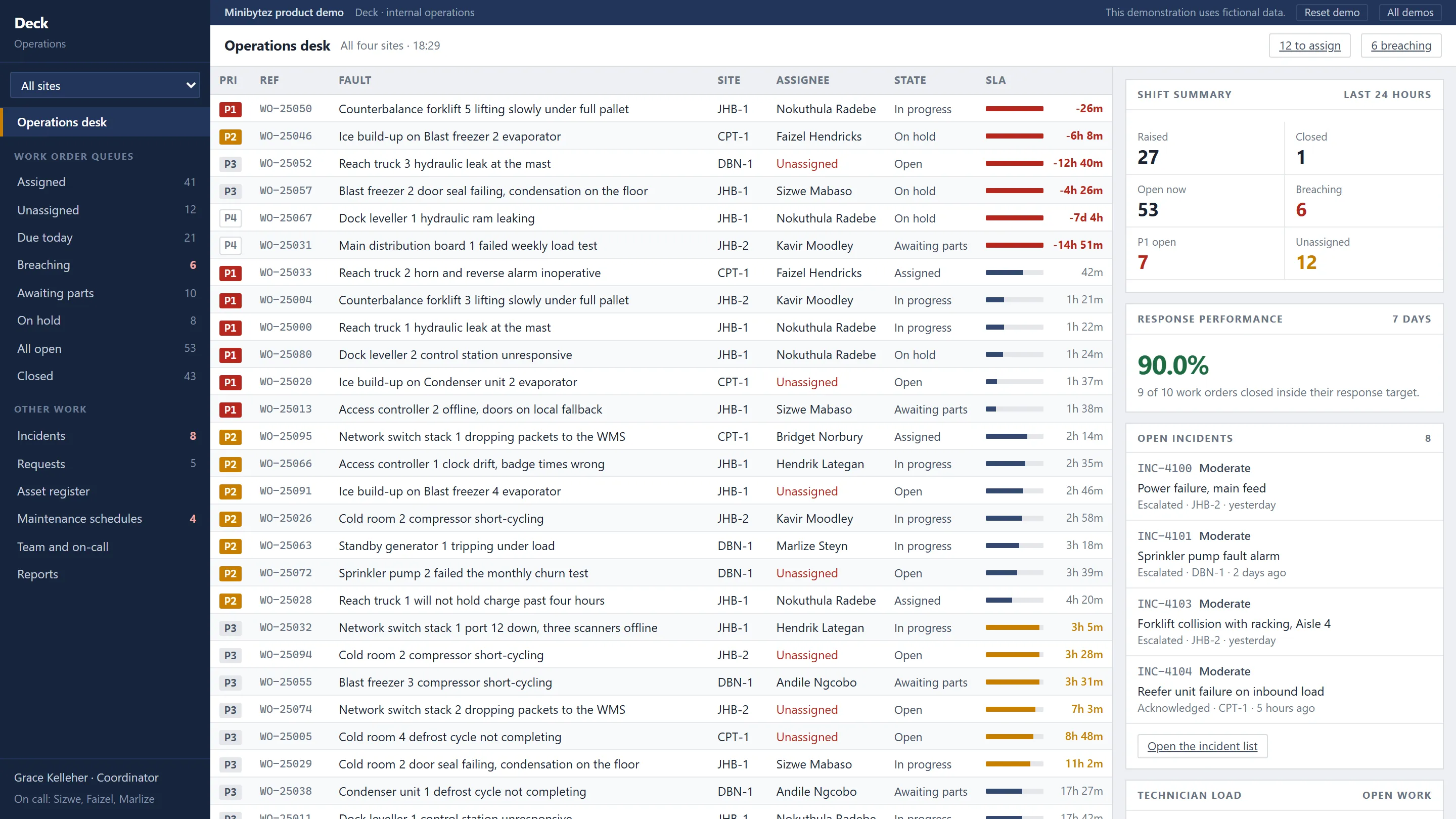
Detail from Deck, a live MiniBytez demonstration with invented data: work orders ranked by what is breaching.
Deck · live demo

Systems we would build

  • Scheduling and dispatch
  • Field applications
  • Asset records
  • Customer portals

Evidence nearby

Capability application

Retail & Commerce

High enquiry and order volume across channels, where speed of response decides the sale and stock, payment and delivery have to agree before anything ships.

Operating chain

  1. Customer
  2. Order
  3. Fulfilment
  4. Payment
  5. Analytics
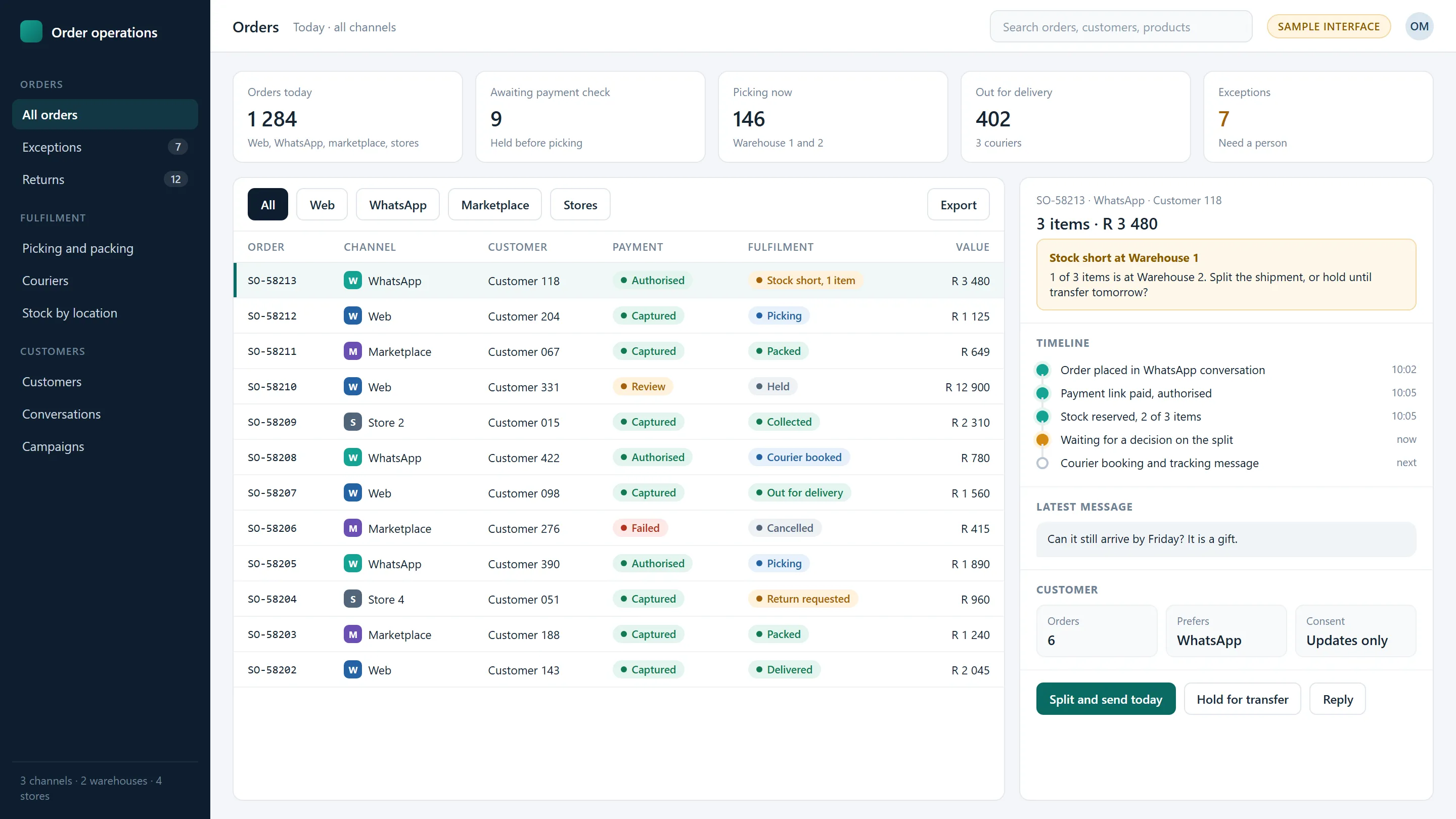
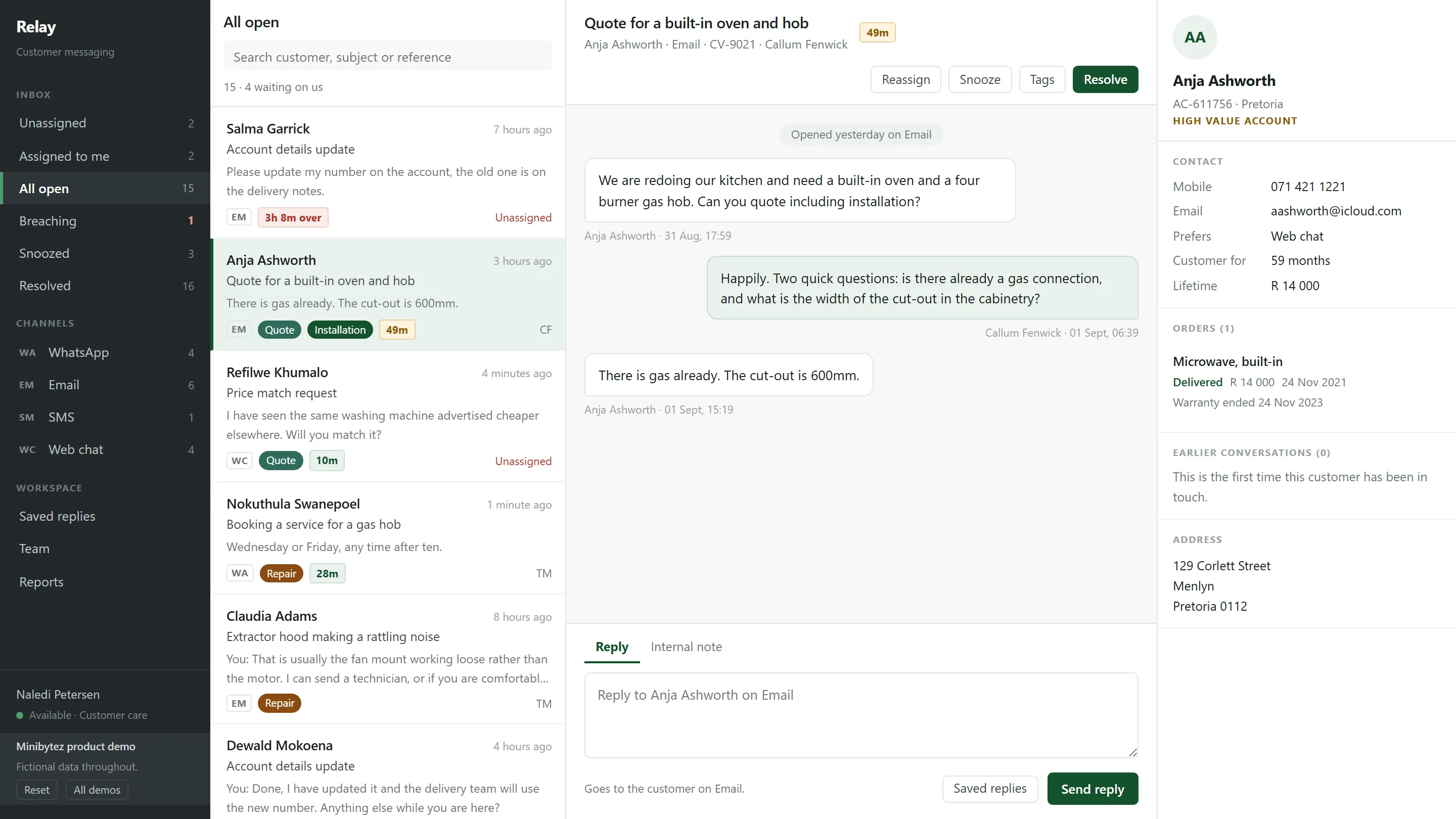
Sample interface · order operations
Sample interface of an order operations screen: orders from web, WhatsApp, marketplace and stores with payment and fulfilment status, and an order held for a decision because one item is short at the warehouse.
Sample interface
Detail from Relay, a live MiniBytez demonstration with invented data: the conversation and the customer in one place.
Relay · live demo

Systems we would build

  • Order operations
  • WhatsApp and inbox
  • Lead routing
  • Campaign attribution

Evidence nearby

Where the proof runs deepestSector delivery

Fitness & Wellness, delivered across the whole operation.

Multi-site operators running memberships, class schedules, physical access and front-desk operations across locations.

Most of our delivered work sits here, which is why it is worth showing in full rather than in summary. It reaches well beyond membership software: the customer record, revenue, the door, automation, integration and the reporting that ties them together, built and then kept running. Every part of it applies to the six sectors above.

www.minibytez.com/demo/membership
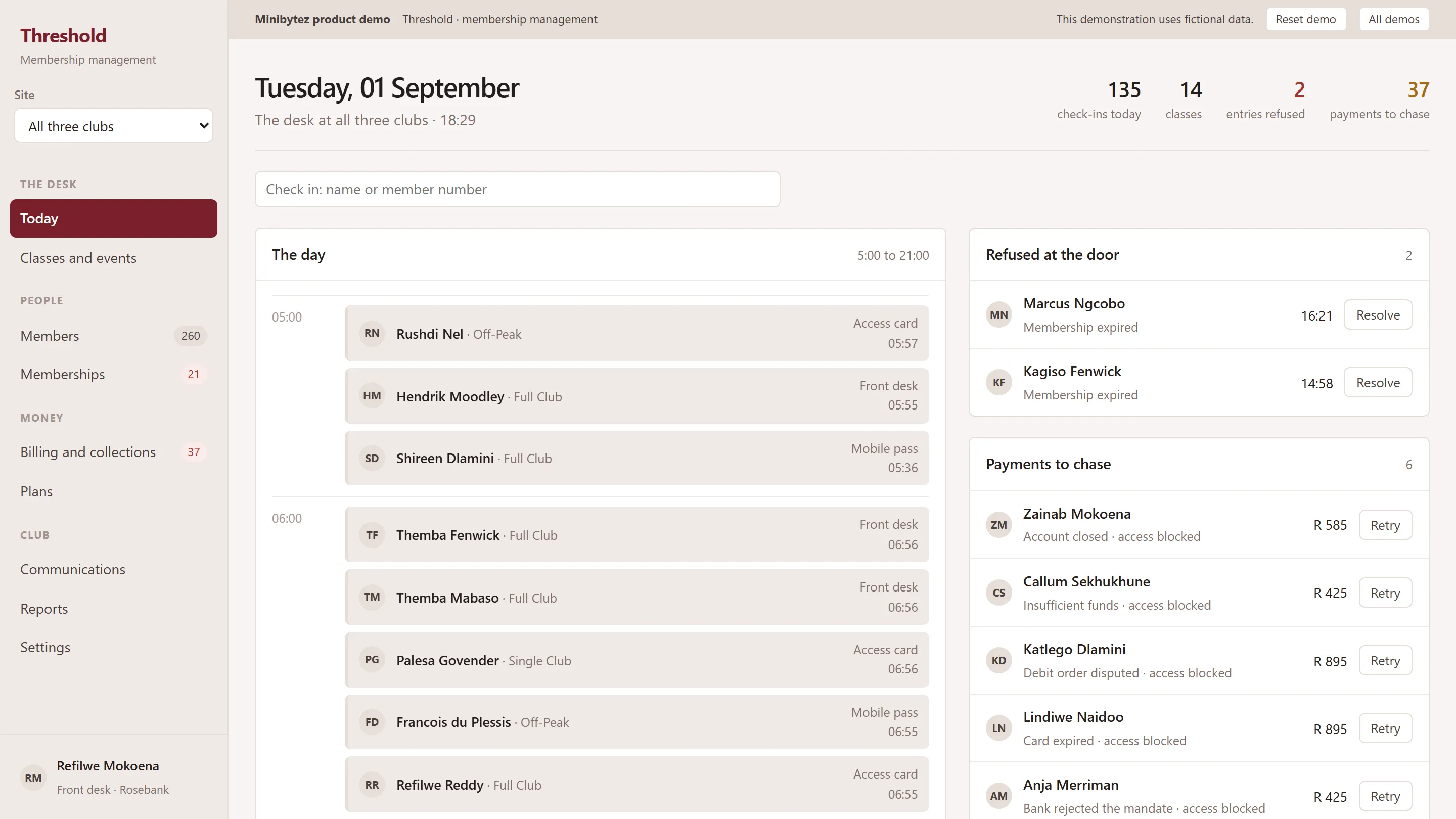
The Threshold demonstration showing a front-desk day view with arrivals, class rosters and member exceptions.
Detail from Threshold, a live MiniBytez demonstration with invented data: a failed payment becomes work, and blocks the door.

Threshold A failed payment becomes work, and blocks the door.

Detail from Perimeter, a live MiniBytez demonstration with invented data: every entry decision, with its reason.

Perimeter Every entry decision, with its reason.

Threshold and Perimeter are MiniBytez demonstrations with invented data. Delivered client systems are confidential and are not shown.Open Threshold live demonstration

What this vertical has exercised

  • Sector delivery
  • Live demonstration
  • Customer record

    • Sector deliveryOne member record and lifecycle
    • Sector deliveryFront-desk staff console
    • Sector deliveryMember applications
  • Revenue

  • Sites and access

    • Sector deliveryReal-time entitlement
    • Sector deliveryMulti-vendor door hardware
    • Sector deliveryCard, QR and mobile credentials
  • Automation

    • Sector deliveryFreezes, upgrades and cancellations
    • Sector deliveryScheduled jobs safe to re-run
    • Sector deliveryDevice monitoring and alerts
  • Data and reporting

    • Sector deliveryLive membership and collections by site
    • Sector deliveryAttendance as business data
    • Sector deliveryDrill-through to the records
  • Integration and platform

    • Sector deliveryEvent-driven updates across systems
    • Sector deliveryPayment provider integration
    • Sector deliveryAudit trail and role permissions
Common system patterns

The words change. The pattern repeats.

A record, a piece of work, a decision, an action and what the business learns from it. The same five stages turn up in every sector we look at, which is why engineering proven in one operation is a sound start in another.

Illustrative pattern: five shared stages, record, workflow, decision, action and insight, as they appear in six sectors.
RecordWho or what the work is aboutWorkflowThe request or job that movesDecisionA rule, an approval or an entitlementHuman checkpointActionWhat happens in the worldInsightWhat the business learns
Professional ServicesClientEngagementScope and time approvalInvoice raisedUtilisation and margin
Property & FacilitiesTenant and assetMaintenance requestContractor accessWork completed on siteCost and compliance by site
Retail & CommerceCustomerOrderPayment and stock checkFulfilmentSales and attribution
Enterprise & Internal OperationsRequester and cost centrePurchase requestBudget approvalPurchase order and paymentSpend against budget
Field & Service OperationsCustomer site and assetJobDispatch by skill and SLAVisit and sign-offService levels
Fitness & WellnessFlagshipMemberBookingEntitlement at the doorEntry and paymentAttendance and retention

Running beneath every stage

  • Integration
  • Automation
  • Data

Illustrative patternThe columns stay fixed. The words change, and so do the rules inside each one.

How we adapt

We start from your operation, not from a product.

No sector gets a template. The order is always the same, and every step is shaped by what the one before it found.

See how we build
  1. Understand the operation

    The rules, the exceptions and the words your people use.

  2. Map the systems

    What exists, what it owns, and where the data disagrees.

  3. Connect what works

    Systems doing their job are integrated, not replaced.

  4. Build what is missing

    Custom software only where nothing fits.

  5. Automate

    Rules first, AI where it helps, a person on anything that matters.

  6. Operate and improve

    Monitoring, support and a backlog that keeps moving.

Your sector

Not on the list?

Sector experience matters less than people expect. What transfers between organisations is the engineering: how data and identity are modelled, how systems are connected safely, how a process becomes reliable software. Your particular rules do not transfer, and we learn those from the people who work with them daily.

We work well with

  • Organisations with physical sites and digital operations
  • Groups running the same process across several entities
  • Companies whose core system cannot be replaced yet
  • Operations that grew faster than their software
  • Regulated work where an audit trail is not optional

Tell us what your business is trying to do.

The first conversation is about your operation, not our services. If we are not the right fit, we will say so.

A few sentences is enough. Please do not include passwords, card details or personal data about your customers.